.svg)
.svg)

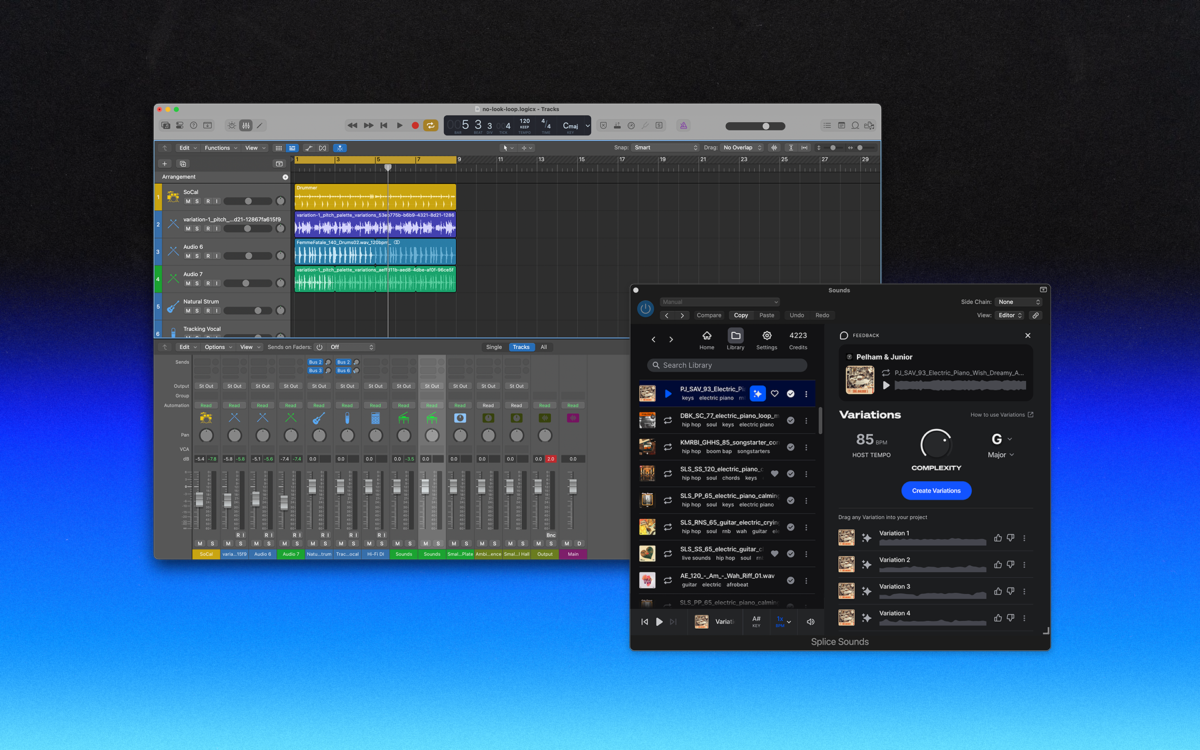
Today, we’re introducing the Splice Sounds Plugin, now available in public beta—bringing Splice’s entire sound library directly into any DAW.
The plugin works across all major DAWs and lets you browse, search, audition, and license Splice’s royalty-free samples without leaving your session. It also introduces Variations, a new way to create unique versions of any Splice sound to custom fit your project—right where you create.
Splice Sounds, now inside your DAW
The Splice Sounds Plugin is a universal DAW plugin (AU, VST3) for macOS 12 or later and Windows 10 22H2 or later that puts Splice directly into your workflow, so you can:
- Browse Splice’s full library of royalty-free, artist-made sounds, and create your own unique variations of samples
- Audition samples in sync with your project and drag them straight into your session
- Use Splice’s latest sound discovery tools like Search with Sound and Describe a Sound
No switching apps. No breaking creative flow. Just the sounds your project needs, when and where you need them.
Ableton, Fender Studio Pro, and Pro Tools users should continue to use the Splice direct integrations in their DAWs for the best workflow experience, plus a rotating selection of free sounds for their projects.
Same sounds, new possibilities
Finding premium samples is just the beginning. That’s why this beta introduces Variations.
Variations is a new feature that lets you generate unique, high-quality versions of any Splice sample, in any key or tempo, tailored to your project (with no artifacts).
Each Variation is a fresh creative outcome—helping you:
- Move beyond popular, recognizable sounds
- Make any sample match your chord progression
- Turn a familiar sample into something unmistakably yours
Every Variation starts from a human-made Splice sound and transforms it into something new. The result isn’t a duplicate—it’s a creative extension.
Creator-centric AI, built responsibly
Variations uses AI to enhance creative control, not replace human creativity.
Things that matter to us—and to creators:
- Variations is ethical by design, trained on licensed, royalty-free content and does not use user projects or personal data to train models
- Original sample creators are compensated when their sounds are used, in line with our commitment to ethical AI and creator fairness
- Variations are royalty-free, covered by the same license as the original sample
Variations unlocks new creative possibilities while continuing to support the artists behind the sounds. To generate Variations, users must first add the source sample to their library by using credits. Downloading a variation requires an additional credit spend, compensating the original creator again. This ensures transparent compensation to the artists behind the sounds, even as new versions are built on their DNA, in your key and tempo. Learn more here.
Sound discovery, reimagined
The Sounds Plugin also brings Splice’s latest discovery tools into your DAW, including Describe a Sound and Search with Sound.
Whether you’re starting with a portion of your project and using Search with Sound for complimentary sample recommendations, or trying to find a sound you hear in your head, without being sure just what to call it, Splice’s discovery tools help you find the right sound faster—without leaving your DAW.
How to get the Splice Sounds Plugin (beta)
The Splice Sounds Plugin is now available in public beta.
To get started:
- Download or open the Splice Desktop App if you don’t have it already
- Go to Apps & Plugins
- Install the Splice Sounds Plugin
- Open it in your DAW and start creating
Alternatively, you can also download the installer for the Splice Sounds Plugin directly by clicking here. The plugin is included for any subscriber with a Splice plan—learn more here.
Try it now
The Splice Sounds Plugin is evolving, and this beta is only the start. We’re excited to learn how you use it—and what you’d like to see next.
April 3, 2026