Find the right sound—without missing a beat
Instantly discover millions of high-quality royalty-free samples, one-shots, and loops. Upload audio or search “dark moody snare” to find exactly what you’re looking for.
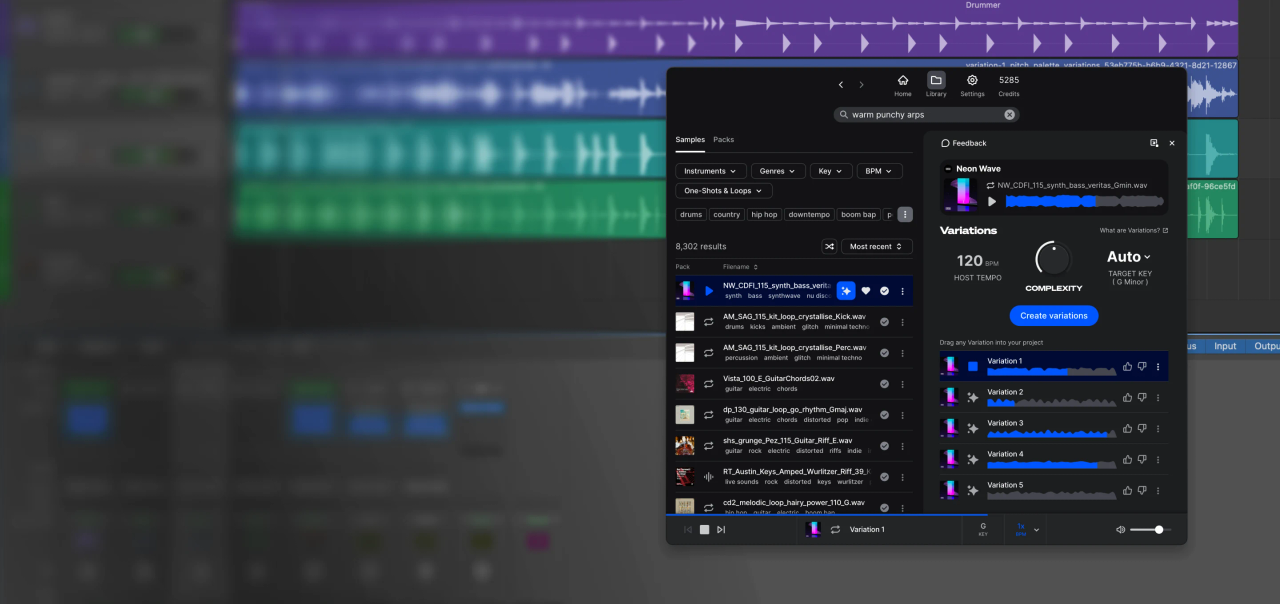
The Sounds Plugin (beta) brings millions of royalty-free, high-quality samples right into your DAW. Search, preview, drag & drop sounds, and create variations—all from within your project.
Instantly discover millions of high-quality royalty-free samples, one-shots, and loops. Upload audio or search “dark moody snare” to find exactly what you’re looking for.
Variations, an AI-powered feature of the Splice Sounds Plugin (beta), lets you create new versions of any Splice sample—unlocking fresh creative possibilities and expanding what’s possible with sound.
Audition sounds in your project’s key and tempo, as your song plays.
Search, browse, and preview for free—only subscribe to download.
Filter by genre, key, and BPM. Upload audio or search.
1. Create a free Splice account
2. Download & install the Sounds Plugin
3. Find it in your DAW's Plugins list and add it to a MIDI channel
4. Explore and preview millions of samples
5. Start your subscription to download sounds and/or drag them into your projects
Yes, you can download the Splice Rhythm Plugin for free. You need a Splice Sounds+, Creator, or Creator+ subscription to access the plugin.
The plugin works across all major DAWs. Ableton, Fender Studio Pro, and Pro Tools users should continue to use the Splice direct integrations in their DAWs for the best workflow experience, plus a rotating selection of free sounds for their projects.
Yes, every single sample on Splice is 100% royalty free, meaning they're free to use, even for commercial use. You can download samples on Splice, then make and release original music with those samples, and you don't owe Splice (or anyone else) any more than your subscription fee, even if your track goes viral.
Use credits to download your favorite samples, loops, one-shots, presets, MIDI & more. All samples are one credit each. MIDI patterns and presets use up to three credits each. Unused credits automatically roll over to the next month. Keep everything you download, even if you cancel.
Yes! In fact, we can even supply you with documentation in case you ever need to prove that your music is royalty-free and properly licensed. Read more here.
First, find any sample in the Splice catalog. Then click the Variations button to generate new, unique versions of the sample in any key and tempo. Creators are compensated for any variation you use.