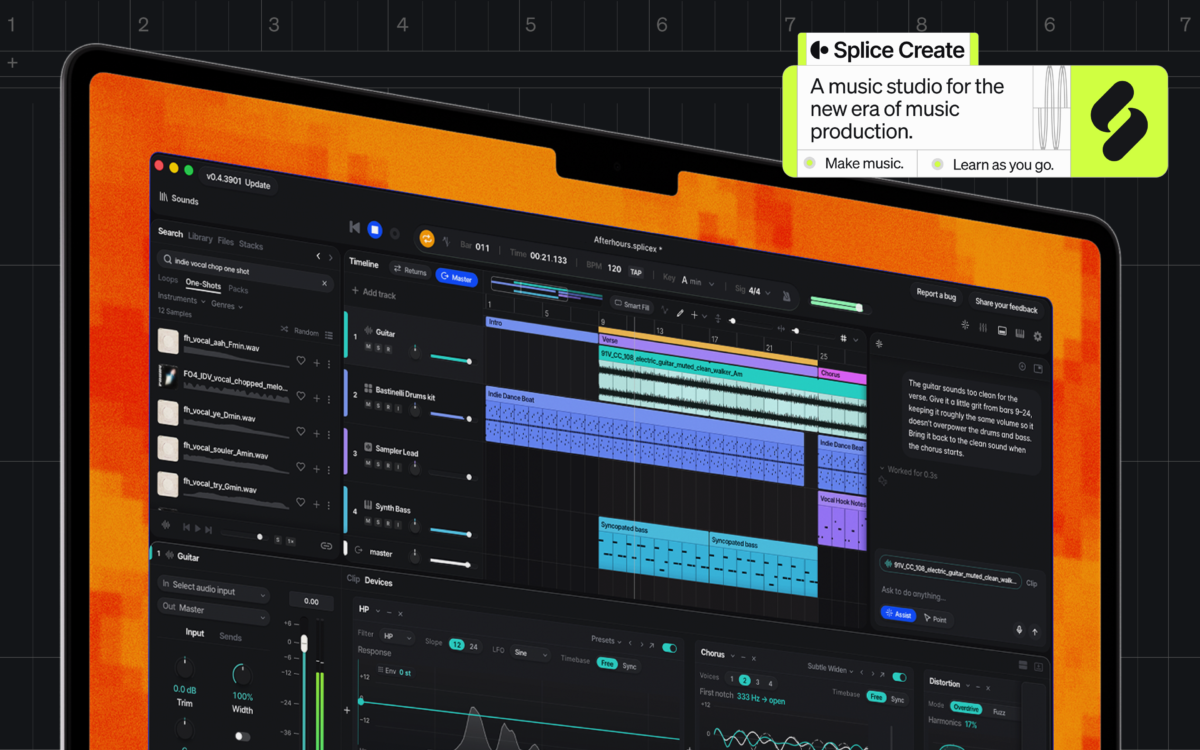
Splice Create is a music studio for the new era of music production.
Over the past decade, Splice has worked alongside leading artists, producers, and sound designers to build a royalty-free catalog of sounds that music creators use every day, all around the world—and this is what’s at the heart of Splice Create. Built on Splice’s millions of human-made and fully-licensed sounds, expressive instruments, and production essentials, Create is our new DAW experience for people who love music, by people who love music.
See our video for an introductory walkthrough, and read on below.
What is Splice Create?
Splice Create is an all-in-one DAW with the Splice catalog, instruments, and effects built in. It’s uniquely designed to sharpen your music production skills and help you break through creative blocks.
Many parts of Create can also be controlled by both voice and text—use natural language to find sounds, group drums, apply effects, and handle repetitive tasks that might normally break the creative flow. Enable “Point Mode,” and an interactive pointer will walk through the interface and teach creators of all levels new production techniques to add to their toolkits, step-by-step. The more you make, the more you’ll learn.
With an extensive library of royalty-free sounds and samples, high-quality virtual instruments from Splice INSTRUMENT, native integrations with VSTs, and the option to export audio for use with other DAWs, Create taps into the full breadth of what Splice has to offer.
“I’d been messing with ‘Innocent Smile’ for years, added a break beat from Splice, and it came alive. Splice Create gives people just starting out that same feeling, and you pick up how it works as you go,” says GRAMMY-nominated MC and producer Skepta. “Big up Splice, always there to cook with, even on my way to Ibiza at 30,000 feet.”
Many music tools today either make the song for you, or assume you already know how. Splice Create is different—it helps you learn how to make the music you want. You determine and describe what you’re after, Create points the way only as you need, and you call all of the shots.
How to get started with Splice Create
Splice Create is now available in beta as a standalone Mac app (with Windows and web coming soon), and you can get started with it for free here. Once you’re ready to share a song, sign up for a Create Pro subscription with our special introductory pricing of $9.99/month. We can’t wait to hear what you’ll create.
November 5, 2026