Crate dig with Claude
The right sounds without the rabbit hole. Splice brings its legendary, human-made sounds into Claude—so you can build alongside tools like Adobe, Ableton, and Blender.
Get started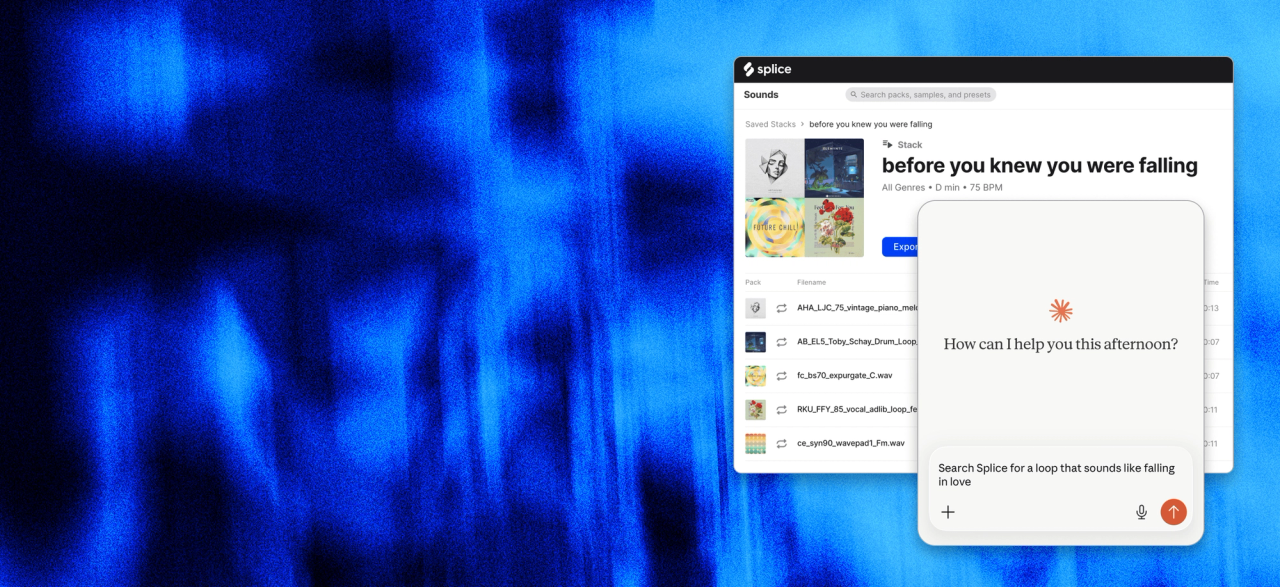
Splice is now inside Claude—so you can find, shape, and build with real sounds using nothing but words.
The right sounds without the rabbit hole. Splice brings its legendary, human-made sounds into Claude—so you can build alongside tools like Adobe, Ableton, and Blender.
Get startedJust describe what you’re looking for and get sounds that match.
Claude understands your project and helps you build from there.
Generate stacks, kits, and starting points—ready to drop into your workflow.
The Splice MCP Server lets you search Splice’s sample catalog, build stacks, and download sounds directly inside AI tools like Claude — without opening the Splice app or switching tabs.
Just describe what you’re looking for in plain language, and the AI handles the rest.
Search by feel: Describe a sound in natural language ("dark lo-fi guitar loop around 80 BPM") and get matching results
Download samples: Use your credits to save sounds directly to your computer
Build full stacks: Describe a vibe and generate a multi-layer arrangement (drums, bass, keys, etc.), saved to your library
Build Stacks from a sample: Use a loop as a starting point and generate a full stack around it
Edit stacks: Rename, change BPM, add or remove layers, or swap sounds
Share stacks: Generate a public link anyone can open in a browser
Nope. If your AI tool supports MCP, you just add the server URL and log in.
Any AI tool that supports HTTP-based MCP servers can connect using the same URL.
Searching and building stacks is free. Downloading requires a paid subscription and uses credits.
The Splice MCP Server is currently in beta and available to all users with a Splice account.
Not at this time.